


Office.
12B/18 Groves Ave.
Mulgrave, NSW
Australia.
Tel: (02) 8806 3557
Em: info@sydneyict.net.au
Web: sydneyict.net.au

Last updated: September 2026
If you’ve recently signed into Microsoft 365 and been prompted to “set up a passkey,” you’re not alone. From September 2026, Microsoft is rolling out passkeys as the default sign-in experience across Entra ID (the identity platform behind Microsoft 365), and by February 2027, Microsoft’s own SMS and voice authentication is being retired entirely.
If you’ve been tapping “skip for now”, or suspect your staff have been too, here’s what you actually need to know, and what it means for your business.
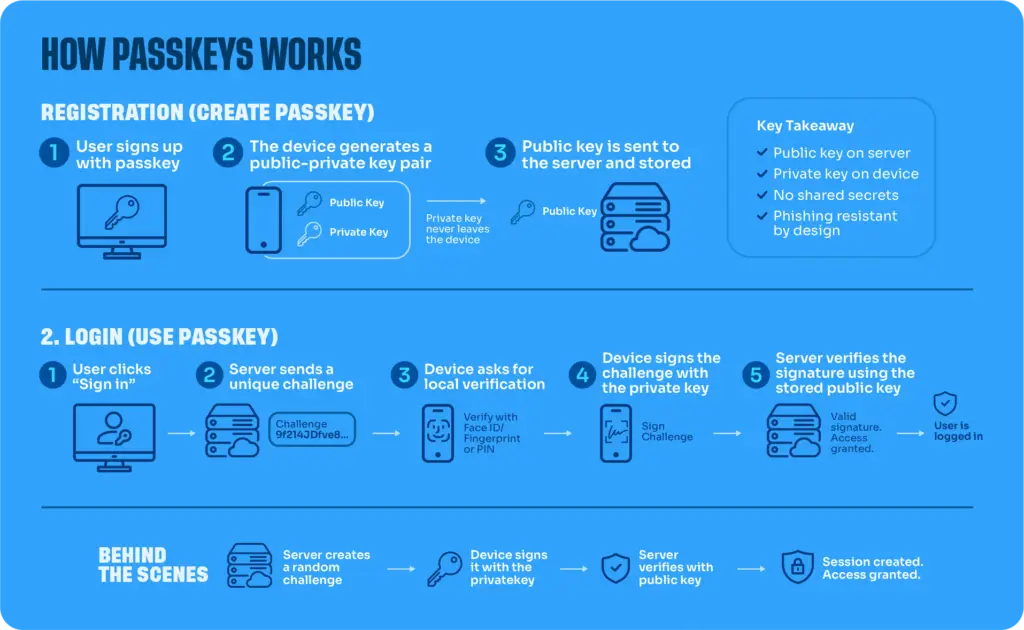
A passkey is a modern, passwordless way to prove it’s really you signing in. Instead of typing a password (and a separate code from a text message or app), you unlock access with your fingerprint, face, or device PIN. The same way you might unlock your phone.
Behind the scenes, a passkey uses cryptography rather than a password: your device and the service you’re logging into exchange a unique digital “key” that can’t be guessed, reused, or phished the way a password can. There’s no code to intercept and nothing to type. Which is exactly why it’s considered the strongest form of sign-in security available today. As a Microsoft 365 partner, this is a change we’re helping clients navigate directly within their existing environment.
Multi-factor authentication (MFA) means proving who you are using two or more of the following:
Two-factor authentication (2FA) is simply MFA using exactly two of these factors. For example, a password plus a text message code. MFA is the broader term and can include three or more factors, which is common for high-privilege accounts like IT admins or finance staff. The key point: not all MFA is equal. A password plus an SMS code is technically MFA, but it’s far weaker than a password plus a passkey.
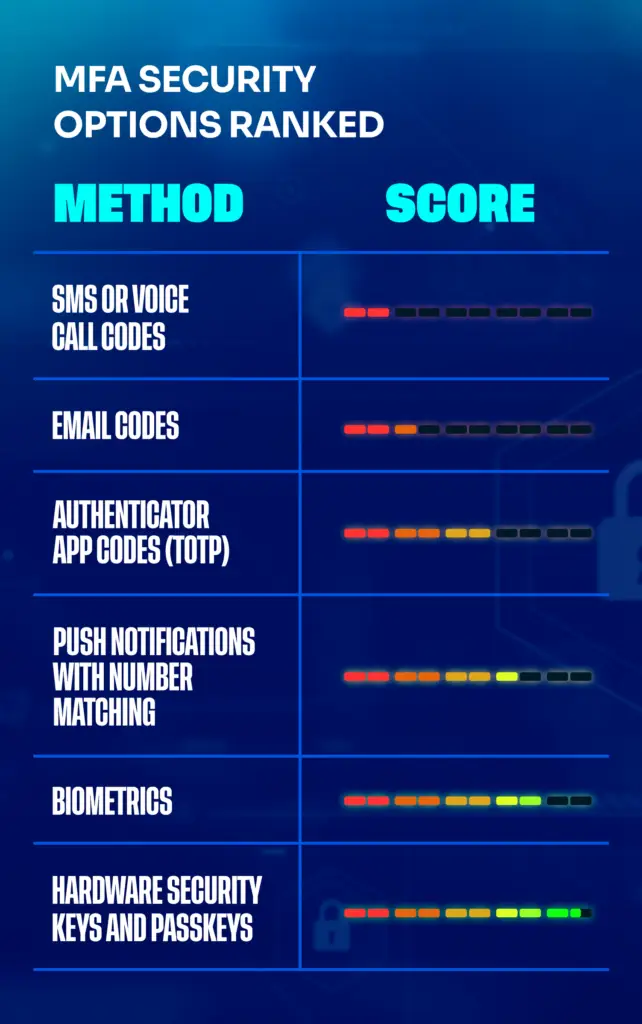
Not every MFA method offers the same protection. Here’s how the common options stack up, with an indicative security score out of 10, based on guidance from the Australian Signals Directorate (ASD) and Australian Cyber Security Centre (ACSC) via the Essential Eight framework.
| MFA type | Security score | Why |
| SMS or voice call codes | 2/10 | Vulnerable to SIM-swapping and interception |
| Email codes | 3/10 | Little protection if email is already compromised |
| Authenticator app codes (TOTP) | 6/10 | Codes generated on-device, not sent over the phone network |
| Push notifications with number matching | 7/10 | Reduces MFA fatigue attacks |
| Biometrics | 8/10 | Tied to a specific device; hard to intercept remotely |
| Hardware security keys and passkeys | 9.5/10 | Phishing-resistant by design |
Note: these scores are an indicative guide to relative strength, not an official industry-wide rating.

2/10 (weakest)
A one-time code sent by text or phone call. Convenient, but vulnerable to SIM-swapping (where a scammer tricks your phone provider into moving your number to their device) and interception. Both the ACSC and CISA advise against relying on SMS as a second factor.

3/10 Similar weaknesses to SMS
If an attacker already has access to your email, this factor offers little protection.

6/10
Apps like Microsoft Authenticator generate a rotating code directly on your device. Codes never travel over the phone network, making this a solid step up from SMS.

7/10
A prompt to approve or deny a sign-in on your phone. Number matching (entering a number shown on-screen) helps prevent “MFA fatigue” attacks, where users are tricked into approving a fraudulent request.

8/10
Fingerprint or facial recognition tied to your specific device. Difficult to intercept remotely, though a backup method is still needed if a device is lost.

9.5/10 (strongest)
FIDO2/WebAuthn-based methods (physical security keys or passkeys) are considered phishing-resistant by design. In practice, that means the sign-in is locked to the real website or app it was set up for, so even if a staff member is tricked onto a convincing fake login page, the passkey simply won’t work there. No method eliminates risk entirely, but this comes closest.
For more detail, see the ACSC’s Essential Eight guidance.
MFA strength shouldn’t be left up to individual employees to choose. It should be a policy decision, set and enforced centrally as part of your broader IT security strategy. For Microsoft 365 businesses using Entra ID, this typically means:
Deciding centrally which methods (passkeys, authenticator app, SMS, etc.) are available to staff, rather than leaving SMS enabled by default.
Microsoft’s built-in tool that nudges users to register a passkey during sign-in. Users can “snooze” the prompt a limited number of times before registration becomes required.
Microsoft’s rules engine for requiring stronger authentication on sensitive access (admin accounts, finance systems, remote access), ideally piloted with a small group first before wider rollout. As a general rule: admins, finance, and leadership accounts (the most targeted) should be prioritised for passkeys or hardware keys first.
From 1 September 2026:
Microsoft begins rolling out passkeys as the default authentication experience across Entra ID. Staff still using SMS or voice authentication will start seeing prompts to register a passkey.
From 1 February 2027:
Microsoft retires its native SMS and voice authentication services entirely. After this date, any business still relying on Microsoft-delivered SMS/voice MFA will need an alternative in place.
But don’t wait for the deadline…
For most businesses, this isn’t just an IT housekeeping item; it’s worth actioning now, for a few reasons.
Visibility is often lower than you’d expect.
Many businesses simply don’t have a clear, tenant-wide picture of which staff are still relying on SMS or voice authentication. Without an audit, you won’t know your real exposure until users start hitting the enforcement deadline… potentially all at once.
The risk of lockouts.
If staff dismiss the passkey nudge indefinitely and haven’t set up an alternative before February 2027, they risk being locked out of their accounts entirely once SMS/voice is retired. Disrupting their access to email, files, and everyday systems.
If you genuinely need to keep SMS or voice authentication.
For example, for regulatory or accessibility reasons, this requires deliberate planning ahead of the deadline, not a last-minute scramble. Microsoft’s replacement path for this involves configuring your own telecom provider, which takes setup time.
If your business hasn’t planned for this yet, now is the time – before the prompts turn into a hard requirement. And that’s where Sydney ICT can help.
As a Microsoft 365 partner, we’re already helping clients get ahead of this change. Depending on where your business is at, we offer:
We run an audit across your Microsoft 365 tenant to identify exactly which staff are still relying on SMS or voice authentication, so you know your real exposure before the deadline hits.
We configure your authentication methods policy, set up and manage a registration campaign, and handle device-specific onboarding for your team – whether that’s Windows Hello, iOS, or Android.
For regulated businesses that need to retain SMS or voice authentication, we can configure a customer-managed telecom provider once Microsoft’s Security Store option becomes available.
Don’t wait for the hard cutover to catch your team off guard. Get in touch with Sydney ICT today to book a discovery audit and find out exactly where your business stands.
Get in touch
A passkey uses cryptography instead of a typed password. When you set one up, your device creates a unique digital key pair; one half stays securely on your device, the other is shared with the service you’re signing into. When you sign in, you unlock the passkey with your fingerprint, face, or PIN, and the two halves confirm your identity without ever transmitting a password that could be stolen or guessed.
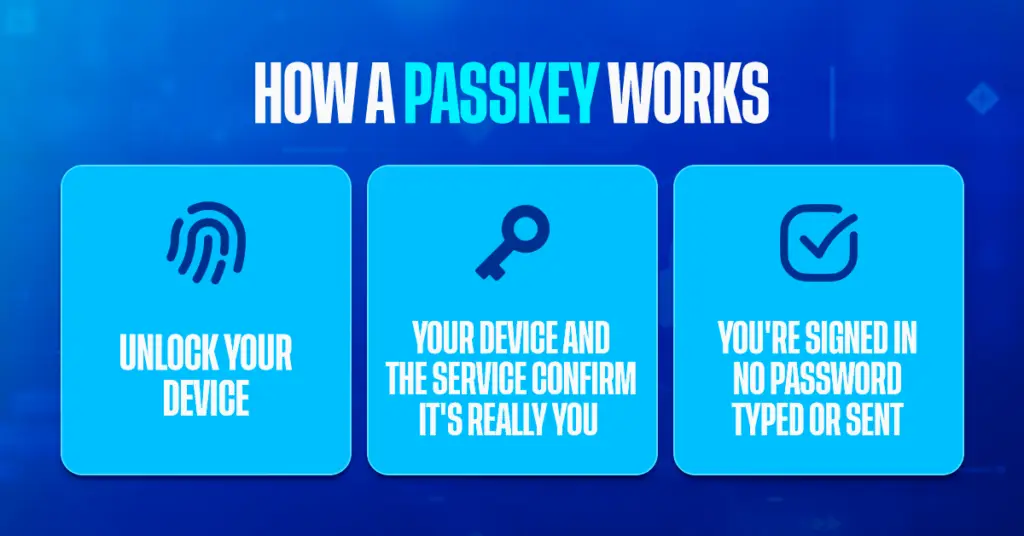
A password is something you type and remember, which makes it vulnerable to phishing, guessing, and reuse across sites. A passkey is stored securely on your device and unlocked biometrically or with a PIN. It can’t be phished, reused, or guessed, because there’s no shared secret being typed or transmitted.
No. 2FA (two-factor authentication) is a specific type of MFA that uses exactly two factors. MFA is the broader term and can involve two or more.
Passkeys and hardware security keys (FIDO2/WebAuthn) are currently the most secure, phishing-resistant options available, and are recommended as the “gold standard” by both the ACSC’s Essential Eight and CISA.
Here are all of the options ranked:
In Microsoft 365, MFA is managed through Entra ID (formerly Azure AD) via the authentication methods policy, which controls which sign-in methods (passkeys, Authenticator app, SMS, and others) are available to your staff, and Conditional Access, which enforces when and where stronger authentication is required.
Microsoft begins rolling out passkeys as the default authentication experience in Entra ID from 1 September 2026, and retires native SMS and voice authentication entirely from 1 February 2027.
From September 2026, Microsoft is making passkeys the default sign-in method in Entra ID, and SMS/voice authentication is being retired from February 2027. Businesses that need to keep SMS or voice authentication for specific reasons will need to plan an alternative before that date.
Users can postpone (“snooze”) the registration prompt a limited number of times, but once SMS/voice authentication is retired in February 2027, anyone without an alternative method set up risks being locked out of their account.
It’s better than no MFA at all, but both the ACSC and CISA advise against relying on SMS as a primary method, due to its vulnerability to SIM-swapping and interception.
Yes. Passwordless authentication (like passkeys) replaces the password itself, but it’s still typically paired with a second factor, such as your device and a biometric check, so it remains a form of MFA, just a stronger one.
If this guide was useful, you might also like:

Artificial intelligence is no longer something only large enterprises are thinking about. Small and medium businesses...
Artificial intelligence is now part of everyday business. Teams are using AI to draft emails, summarise documents,...
Artificial intelligence and automation are no longer future concepts. For many businesses, they’re already part of...

0 Comments